Instructions Purpose: To View English on KOD-600

KOD-600

Welcome to KOD - 600 Language setup Instruction page. This page contains details instructions on how to setup your machine to view English. Voice instructions also available under Express Instruction section. Simply place your mouse cursor over the link right next to to listen!

EXPRESS INSTRUCTIONS

STEP BY STEP INSTRUCTIONS

Note: Open Tray (may be needed)

¡@


EXPRESS INSTRUCTIONS:                                                                 Back
Note: Open Tray (may be needed)
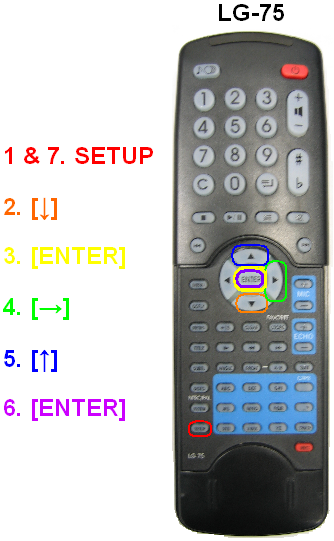
Express Key Strokes on Remote LG-75 (See figure "Remote")

¡@

Please place your mouse cursor over the link right next to to listen to voice instructions.

¡@

Step 1.  Step 2. Step 3. Step 4. Step 5. Step 6. Step 7.
[SETUP] [ENTER] [ENTER] [SETUP]


STEP BY STEP INSTRUCTIONS:                                                         Back
¡@

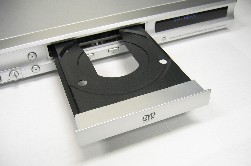
I.) Open Tray

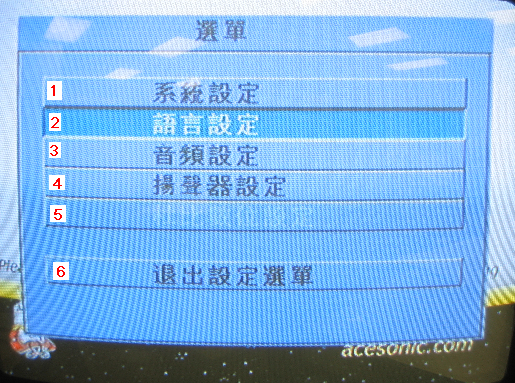
II.) Press [SETUP] - you should see the following screen:

Options in English

Main Menu

1.) System Setup
2.) Language Setup
3.) Audio Setup
4.) Speaker Setup
5.) Digital Setup
6.) Exit Setup

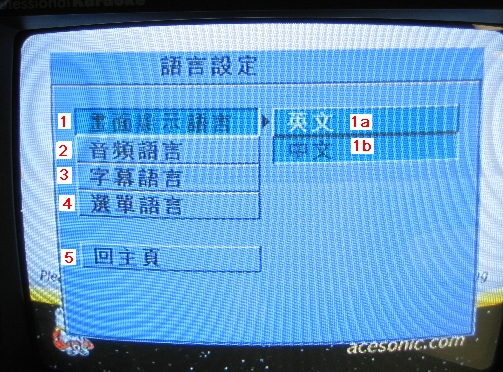
III.) Select the 2nd option by pressing down 2. arrow, Press 3. [Enter], then you should see:

Options in English

Language Menu

1.) OSD Language
  • 1a. English
  • 1b. Chinese
2.) Audio Lang
3.) Subtitle Lang
4.) Menu Lang
5.) Main Page
¡@

IV.) Select the 1st option on the right by pressing 4. arrow, follow by 5. and 6. [ENTER] (you should be able to read English by now)

V.) Press 7. [SETUP] to exit Menu

Back

.